High Density GameServers
Depending on the setup and resource requirements of your game server process, sometimes it can be a more economical
use of resources to run multiple concurrent game sessions from within a single GameServer instance.
The tradeoff here is that this requires more management on behalf of the integrated game server process and external systems, since it works around the common Kubernetes and/or Agones container lifecycle.
Here are two different approaches to solving this problem with Agones:
Session/Room Counters
Warning
The Counters And Lists feature is currently Beta, and while it is enabled by default it may change in the future.
Use the Feature Gate CountsAndLists to disable this feature.
See the Feature Gate documentation for details on how to disable features.
Utilising the allocation gameServerState filter as well as the new ability to add Counter capacity and counts to
GameServer records at both allocation time, and from
within the game server process, via the SDK, means Agones is able to atomically track how many sessions
are available on a given a GameServer from the list of potentially Ready or Allocated GameServers when making an
allocation request.
By also using Counters, we can provide Agones the allocation metadata it needs to pack appropriately across the high
density GameServer instances as well.
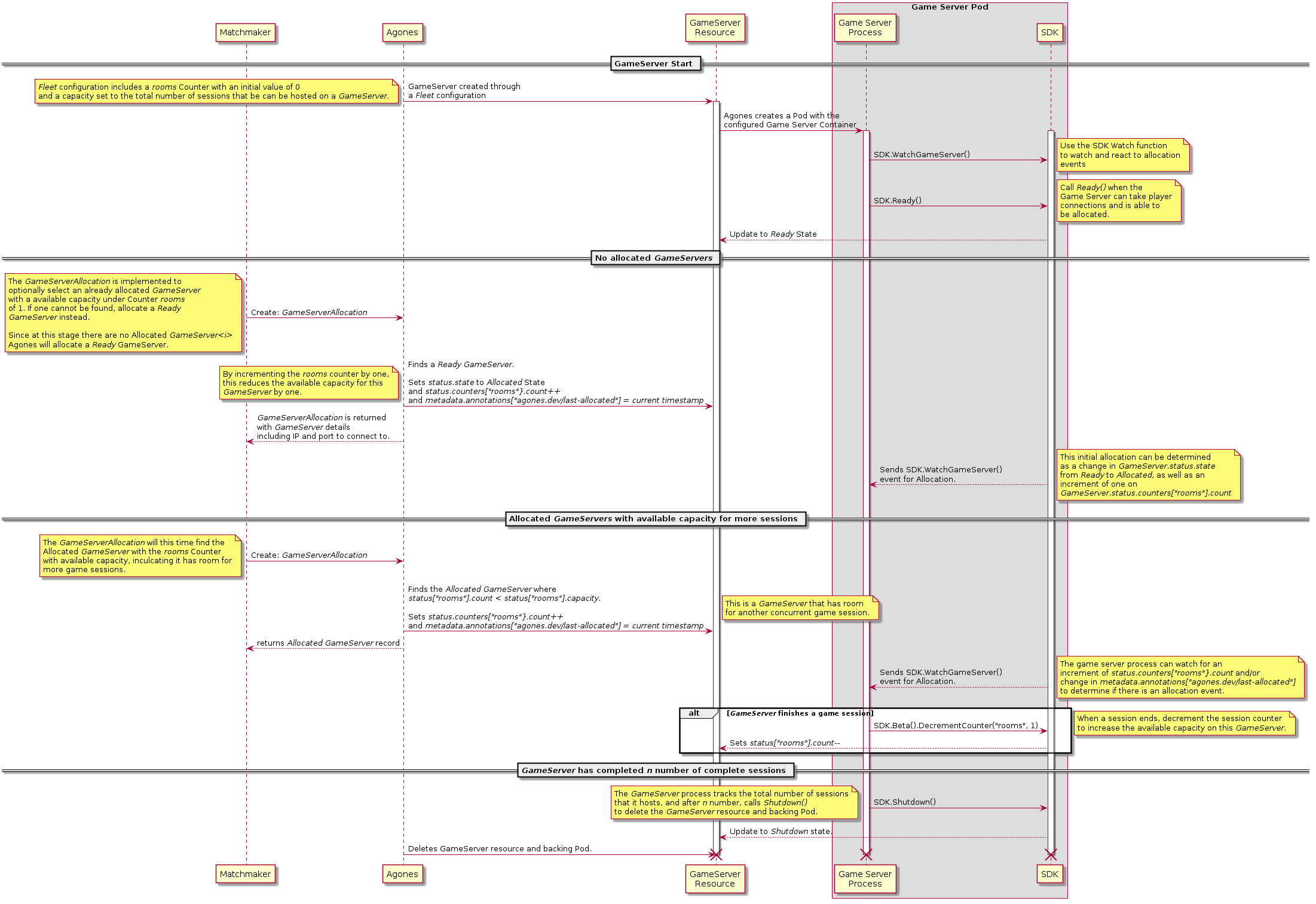
Example GameServerAllocation
The below Allocation will first attempt to find a GameServer from the Fleet simple-game-server that is already
Allocated and also available capacity under the rooms Counter.
If an Allocated GameServer does not exist with available capacity, then use the next selector to allocate a Ready
GameServer from the simple-game-server Fleet.
Whichever condition is met, once allocation is made against a GameServer, the rooms Counter will be incremented by
one, thereby decrementing the available capacity of the room Counter on the GameServer instance. Generally
speaking, once there is no available capacity on the most full GameServer, the allocation will prioritise the next
least full GameServer to ensure packing across GameServer instances.
It will then be up to the game server process to decrement the rooms Counter via the SDK when a session comes to end,
to increase the amount of available capacity within the GameServer instance.
apiVersion: allocation.agones.dev/v1
kind: GameServerAllocation
spec:
  scheduling: Packed
  priorities:
    - type: Counter
      key: rooms
      order: Ascending # Ensures the "rooms" with the least available capacity (most full rooms) get prioritised.
  selectors:
    # Check if there is an already Allocated GameServer with room for at least one more session.
    - gameServerState: Allocated
      matchLabels:
        agones.dev/fleet: simple-game-server
      counters:
        rooms:
          minAvailable: 1
   # If we can't find an Allocated GameServer, then go get a `Ready` `GameServer`.
    - gameServerState: Ready
      matchLabels:
        agones.dev/fleet: simple-game-server
      counters:
        rooms:
          minAvailable: 1 # not 100% necessary, since our Ready GameServers don't change their count value, but a good practice.
  counters:
    rooms:
      action: Increment
      amount: 1 # Bump up the room count by one on Allocation.
When using Packed scheduling, Counter and List priorities are used as a tiebreaker within nodes, to ensure packing
across the nodes is done as efficiently as possible first, and the packing within each GameServer on the node is done
second.
For a Distributed scheduling implementation, Counter and List priorities are the only sorting that occurs across
the potential set of GameServers that are to be allocated.
GameServer Label Locking
Utilising the allocation gameServerState filter as well as the existing ability to edit the
GameServer labels at both allocation time, and from
within the game server process, via the SDK,
means Agones is able to atomically remove a GameServer from the list of potentially allocatable
GameServers at allocation time, and then return it back into the pool of allocatable GameServers if and when the
game server process deems that is has room to host another game session.
The downside to this approach is that there is no packing across re-allocated GameServer instances, but it is a very
flexible approach if utilising Counters or Lists is not a viable option.
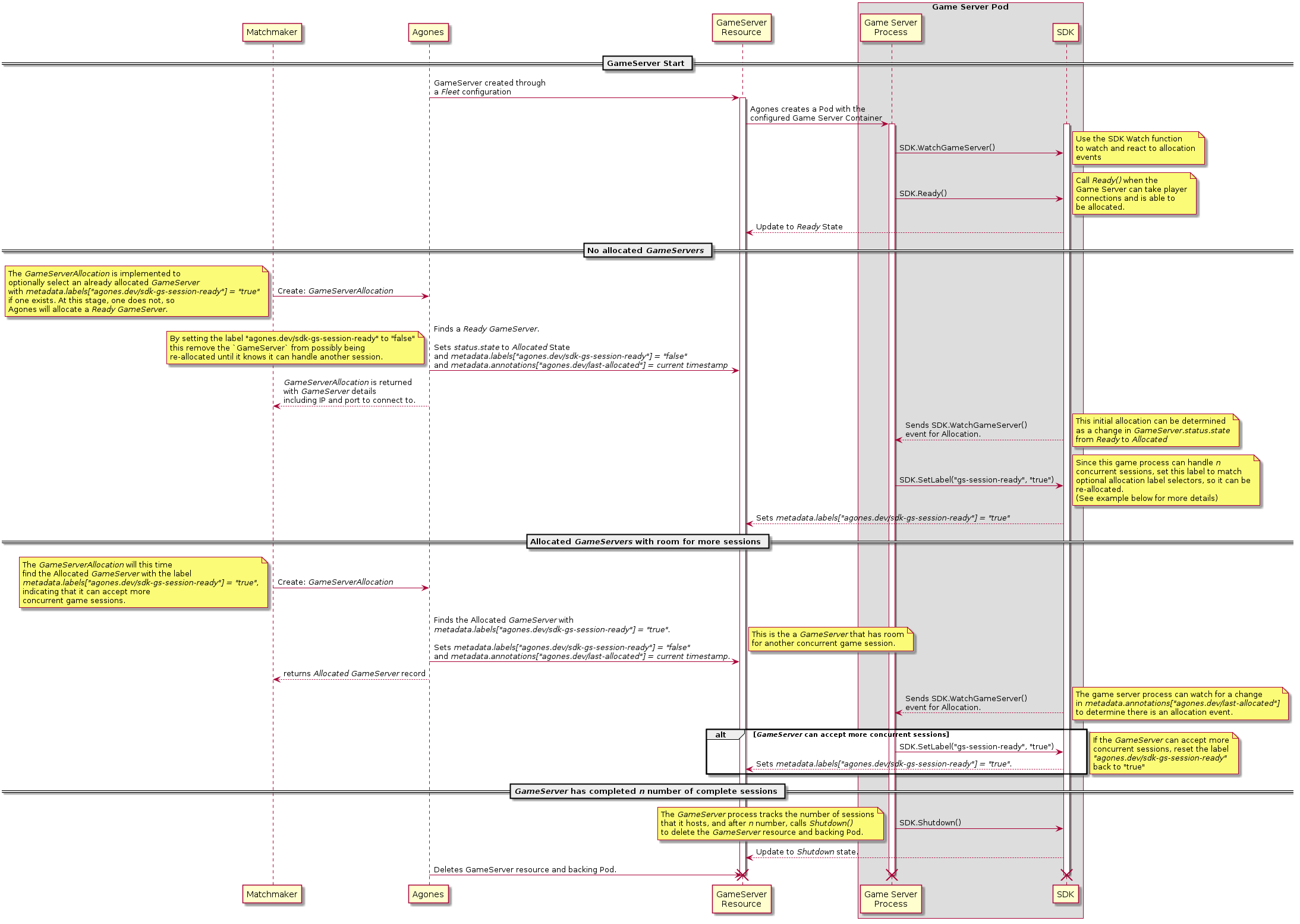
To watch for Allocation events, there is the initial GameServer.status.state change from Ready to Allocated,
but it is also useful to know that the value of GameServer.metadata.annotations["agones.dev/last-allocated"] will
change as it is set by Agones with each allocation with the current timestamp, regardless of if there
is a state change or not.
Example GameServerAllocation
The below Allocation will first attempt to find a GameServer from the Fleet simple-game-server that is already
Allocated and also has the label agones.dev/sdk-gs-session-ready with the value of true.
The above condition indicates that the matching game server process behind the matched GameServer record is able to
accept another game session at this time.
If an Allocated GameServer does not exist with the desired labels, then use the next selector to allocate a Ready
GameServer from the simple-game-server Fleet.
Whichever condition is met, once allocation is made against a GameServer, its label of agones.dev/sdk-gs-session-ready
will be set to the value of false and it will no longer match the first selector, thereby removing it from any
future allocations with the below schema.
It will then be up to the game server process to decide on if and when it is appropriate to set the
agones.dev/sdk-gs-session-ready value back to true, thereby indicating that it can accept another concurrent
gameplay session.
apiVersion: "allocation.agones.dev/v1"
kind: GameServerAllocation
spec:
  selectors:
    - matchLabels:
        agones.dev/fleet: simple-game-server
        agones.dev/sdk-gs-session-ready: "true" # this is important
      gameServerState: Allocated # new state filter: allocate from Allocated servers
    - matchLabels:
        agones.dev/fleet: simple-game-server
      gameServerState: Ready # Allocate out of the Ready Pool (which would be default, so backward compatible)
  metadata:
    labels:
      agones.dev/sdk-gs-session-ready: "false" # this removes it from the pool
It’s important to note that the labels that the GameServer process use to add itself back into the pool of
allocatable instances, must start with the prefix agones.dev/sdk-, since only labels that have this prefix are
available to be updated from the SDK.
Consistency
Agones, and Kubernetes itself are built as eventually consistent, self-healing systems. To that end, it is worth
noting that there may be minor delays between each of the operations in either of the above flows. For example,
depending on the cluster load, it may take approximately a second for an SDK driven
counter change or label change on a GameServer record to be visible to the Agones
allocation system. We recommend building your integrations with Agones with this in mind.
Next Steps
- Read the Counters and Lists guide.
- View the details about using the SDK to change
values on the
GameServer. - Check all the options available on
GameServerAllocation.
Feedback
Was this page helpful?
Glad to hear it! Please tell us how we can improve.
Sorry to hear that. Please tell us how we can improve.
Last modified August 12, 2026: Release-1.60.0 (#4682) (67b44a7)